It starts silently. Your website loads a bit slower than usual. Then, legitimate customers complain they can’t checkout. Suddenly, the site goes completely offline. You check your server logs and see millions of requests flooding in from all over the world.
You are under attack.
A Distributed Denial of Service (DDoS) attack is the digital equivalent of a traffic jam caused by thousands of fake cars blocking the highway. In 2024, these attacks are targeting everyone from small blogs to massive gaming servers.
In this comprehensive guide, we will break down DDoS attacks by Layers, recommend specific Firewall configurations, and show you how to build a fortress around your online business.
Know Your Enemy: Attacks by “Layers”
To stop an attack, you must identify which “door” they are trying to break down. Network engineers use the OSI Model to categorize these threats.
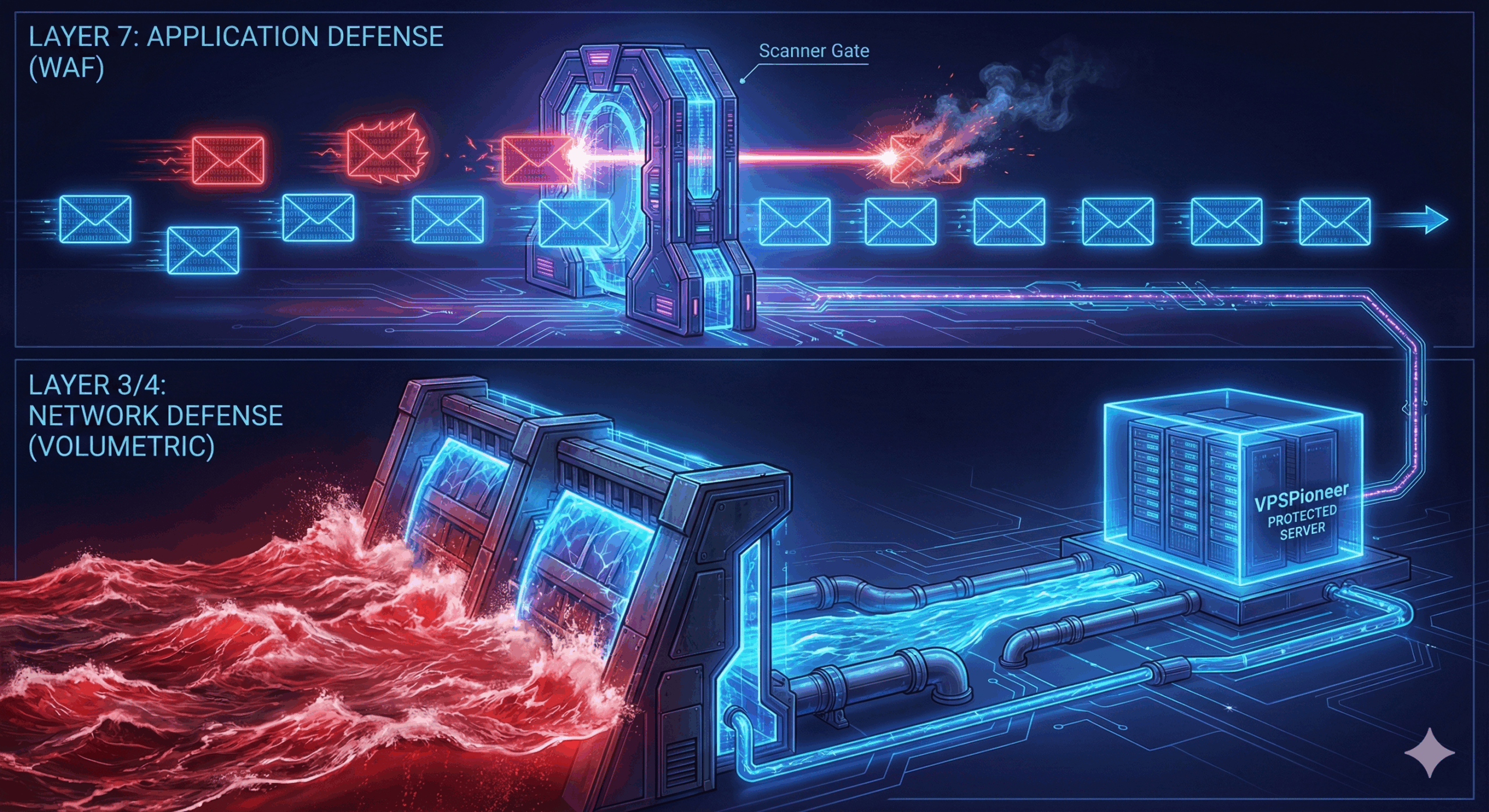
1. The Sledgehammer: Layer 3 & 4 Attacks (Volumetric)
These are “dumb” but powerful attacks. The hacker doesn’t care what is on your website; they just want to clog your internet connection.
- Common Types: UDP Floods, SYN Floods, NTP Amplification.
- What Happens: The attacker sends massive amounts of garbage data to your server’s IP. According to Cloudflare’s DDoS Learning Center, these attacks consume all available bandwidth, making it impossible for real visitors to reach you.
- Defense Strategy: You generally cannot stop this on your server alone because your bandwidth pipe will fill up first. You need upstream network protection, which is standard on VPSPioneer’s network infrastructure.
2. The Silent Assassin: Layer 7 Attacks (Application)
These attacks are sneakier and target the software (WordPress, Apache, Nginx) running your site.
- Common Types: HTTP Floods, Slowloris, SQL Injection.
- What Happens: The bots mimic human behavior. They might repeatedly hit the “Search” button or “Add to Cart,” causing your database CPU usage to spike to 100%.
- Defense Strategy: You need an intelligent guard that inspects the content of the request. For detailed insights on application threats, the OWASP Automated Threats Project provides a definitive classification of these bot behaviors.
Your Digital Shield: Firewall Recommendations
Having a VPS gives you the power to build your own defenses. Here is the essential security stack we recommend:
1. CSF (ConfigServer Security & Firewall)
For most Linux servers, CSF is the gold standard.
- Why use it? It acts as a stateful packet inspection firewall, login/intrusion detection, and security application.
- Key Feature: The “Login Failure Daemon” (LFD) actively watches your logs and bans suspicious IPs instantly, preventing brute-force attacks.
2. ModSecurity (The WAF)
ModSecurity is an open-source Web Application Firewall.
- Why use it? It sits inside your web server and blocks Layer 7 attacks like SQL Injections and XSS.
- VPSPioneer Solution: Configuring WAF rules can be complex. Our Website Security packages include managed WAF protection, so you don’t have to manually tune rulesets.
3. UFW (Uncomplicated Firewall)
If you prefer simplicity on the command line, UFW is perfect for locking down ports.
- Pro Tip: Only open the ports you strictly need (e.g., Port 80/443 for Web, Port 22 for SSH). You can learn how to manage these in our previous guide on Essential SSH Commands.
3 Steps to Bulletproof Your Business
You cannot stop hackers from trying, but you can stop them from succeeding.
Step 1: Hide Your Origin IP
Never point your domain directly to your server’s real IP if you expect attacks. Use a Content Delivery Network (CDN) or a proxy service. This acts as a shield, absorbing the attack at the edge of the network before it touches your VPS.
Step 2: Enable “Under Attack” Mode
Most security services allow you to enable a JavaScript challenge. This forces every visitor to prove they are human (via a browser check) before they allow the connection. This effectively filters out 99% of automated bots.
Step 3: Optimize Your Backend
A slow site falls over faster. An optimized site can handle a larger load before crashing.
- Implement rigorous caching (like Redis or Memcached).
- Optimize your database queries.
- Resource: Read our guide on WordPress Speed Optimization to ensure your server runs efficiently under load.
When to Call for Backup? (Dedicated Hardware)
If you are running a high-stakes operation—like a large E-commerce store or a Gaming Server—standard software firewalls might not be enough.
For these scenarios, we recommend upgrading to Dedicated Servers. Dedicated hardware allows for higher bandwidth capacity and hardware-level firewall options (like Cisco/Juniper), scrubbing bad traffic before it ever touches your machine’s CPU.
Frequently Asked Questions (FAQ)
Q: Does SSL (HTTPS) prevent DDoS attacks? A: No. SSL encrypts data for privacy, but it doesn’t stop traffic volume. In fact, attackers can use “SSL Floods” to exhaust your server’s resources during the encryption handshake. Read more about SSL in our HTTP vs HTTPS Guide.
Q: How do I know if it’s a DDoS or just viral traffic? A: Check your access logs. Real traffic usually comes from diverse “User Agents” and visits different pages. DDoS traffic often hits the same URL repeatedly or uses suspicious User Agents. Tools like Wireshark can help analyze this traffic packet by packet.
Q: Can I set up these firewalls on a Shared Hosting plan? A: On Shared Hosting, VPSPioneer manages the firewalls for you. For custom firewall rules and total control over your security policy, you need a VPS or Dedicated Server.